Revised budget: what it is and how to keep it up to date
Written By Ekke
Last updated 17 days ago
The revised budget is your latest forecast of what each line item will really cost by the end of the project. Keeping it current is what makes Planyard's profit forecast, remaining budget and cost alerts trustworthy.
What a revised budget is
Every project budget in Planyard moves through three cost figures. Each answers a different question:
Net estimated cost: what did we think it would cost when we priced the job? It is fixed at the time of the estimate.
Target budget: what do we want it to cost? An internal goal, can be set slightly below the estimate so the team buys smarter.
Revised budget: what do we now expect it to cost? The project manager's current forecast of the final cost, line by line.
The first two are reference points that stay put. The revised budget is the living one: it starts equal to the target budget and is updated as the project teaches you more. In the wider construction industry this figure is often called the estimated final cost (EFC) or forecast final cost.
The revised budget does not change on its own when you enter invoices, purchase orders or change orders. It reflects judgement: the project manager decides what the line will really cost, taking into account what is already committed, what has been spent and what is still to come.
How to update a revised budget
In the Budget view, hover over the Revised budget cell of the line item you want to change.
Click the pencil icon ✎
Update the quantity, unit price or total.
Add a comment explaining why the forecast changed, for example "Groundworks subcontract signed at £42,500".

The comment matters: months later it tells you and your colleagues why the number moved, and it makes cost reports easier to explain.
How discrepancies are flagged:
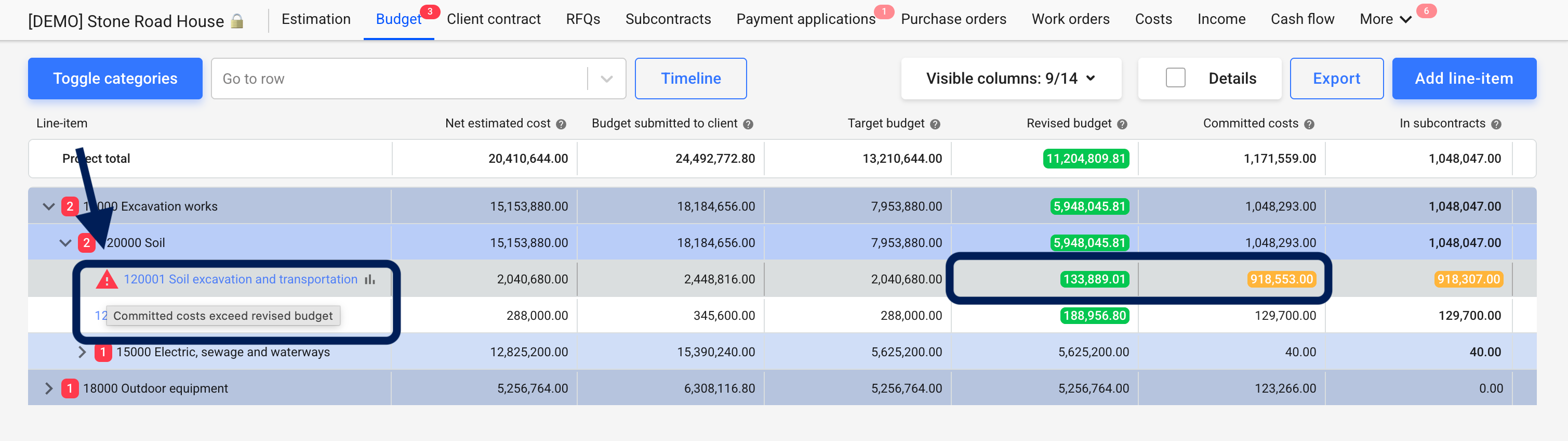
When committed costs on a line item exceed its revised budget, a red label appears next to the line. It means more has been ordered than you expect the line to cost, so either the forecast is out of date or the line is overspending. Review the line and either update the revised budget or act on the cost.
Was this helpful?
Still need help? Ask the team